
One dashboard. Multiple WhatsApp numbers.
Run separate numbers for support, sales, billing or different regions, each with its own inbox, and manage them all from a single, unified dashboard.

More numbers shouldn’t mean more chaos
Separate numbers for separate jobs, managed together, not in separate apps.
Without multi-number
- A separate phone or login for each number.
- Sales messages land in the support queue.
- No single view of all your numbers.
- Reporting means stitching spreadsheets.
With WA Desk multi-number
- Every number in one dashboard.
- Each number routes to the right team.
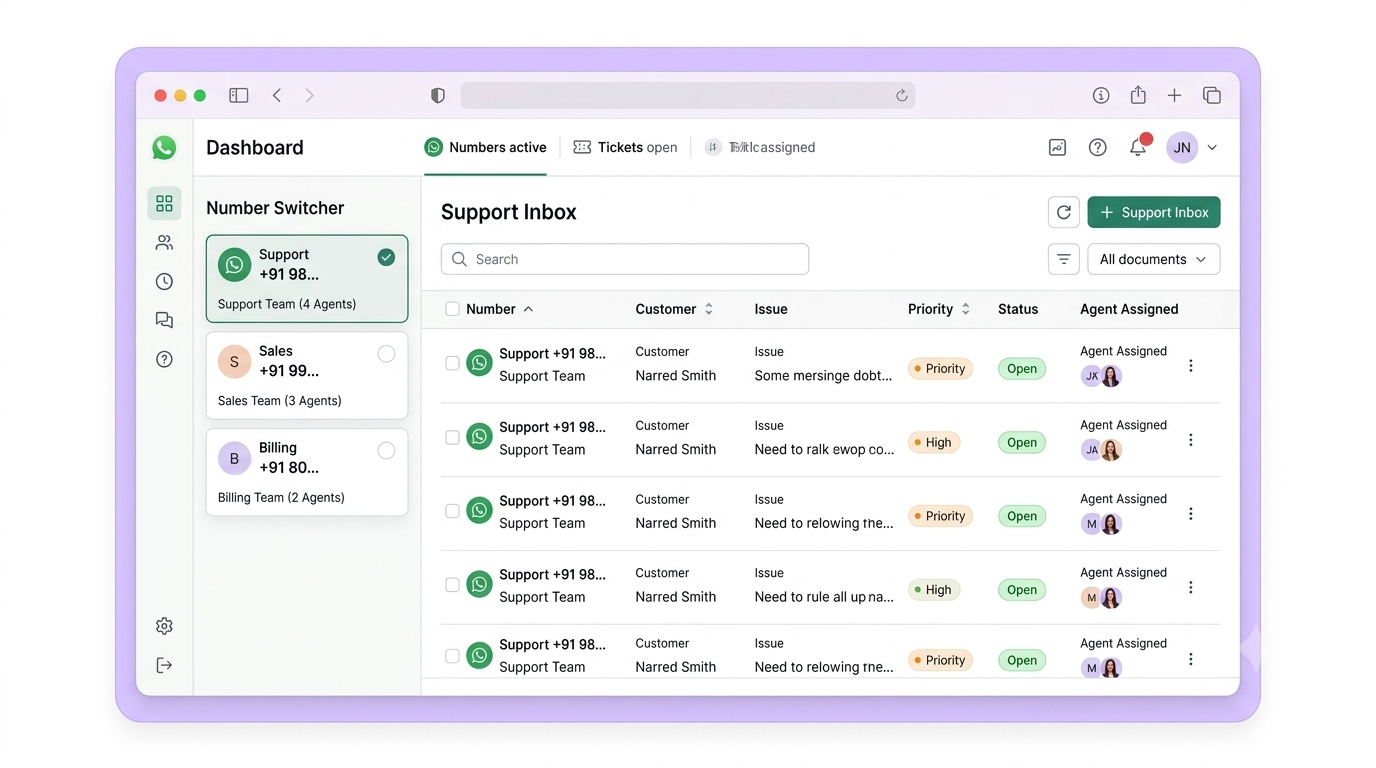
- Per-number inboxes, one unified view.
- Reporting combined or by number.
One platform for all your numbers
Multiple numbers
Connect several WhatsApp numbers, each with its own inbox.
Department routing
Each number routes to the right team automatically.
Regional coverage
Run region-specific numbers from one central place.
Unified reporting
See all numbers together, or break metrics down by number.
Add as many numbers as you need
Connect a WhatsApp Business number for each use case, support, sales, billing, order tracking, via the official API, in minutes, with no technical expertise.
- Each number on the official WhatsApp Business API
- Support, sales, billing or tracking numbers
- Add a new number in minutes
- No developers required
Per-number inboxes, automatic routing
Every number gets its own inbox, and messages route to the right team based on the number they arrived on, while supervisors keep one unified view across all of them.
- Separate inbox view per number
- Auto-assign to teams by number
- Agents see only their relevant numbers
- Supervisors get a view across all numbers
Each number, its own behaviour
Give every number its own greeting, chatbot flow, office hours and canned replies, so your sales line feels like sales and your support line feels like support.
- Independent chatbot flows per number
- Custom greetings for each number
- Different office hours per number
- Unique canned responses per department
All your numbers, one dashboard
Switch between numbers, route to teams and report across them, without ever leaving WA Desk.
Scale your numbers in three steps
1. Connect your numbers
Add each WhatsApp Business number via the official API.
2. Route to teams
Send each number to the right team, with its own behaviour.
3. Manage centrally
One dashboard, one team, unified reporting across all.
For teams that outgrow one number
Different departments, regions or brands, one place to run them all.
Explore more: Integrations · Team inbox · Pricing
Scale your WhatsApp presence without the chaos
See multi-number management live, and we’ll help you connect your numbers.